
1. Overview
The Groups API allows you to create, retrieve, list, update, and delete groups in SpeakUp. You can also manage group membership by adding or removing users.
Base Endpoint: {API_BASE_URL}/scim/v2/Groups
2. Authentication
All requests require the Authorization header with a bearer token. See the SpeakUp SCIM Overview for authentication details

3. Response Structure
|
Attribute |
Type |
Description |
|---|---|---|
|
|
string |
Unique identifier (system-generated, returned by API) |
|
|
string |
The name of the group |
|
|
string |
External identifier (e.g. from IdP); unique if provided; can be set on create/update |
|
|
array |
List of user objects belonging to this group |
|
|
string |
User ID of a group member |
|
|
string |
User's email (returned in responses) |
|
|
string |
Full URL to the User resource (returned in responses) |
|
|
string |
Always |
|
|
string |
ISO 8601 timestamp when group was created |
|
|
string |
ISO 8601 timestamp when group was last modified |
|
|
string |
Full URL to this Group resource |
4. Create a Group
Create a new group in SpeakUp. The displayName is required and must be unique. You may optionally provide externalId and initial members.
HTTP Method: POST
Endpoint: /scim/v2/Groups
4.1 Request (minimal) 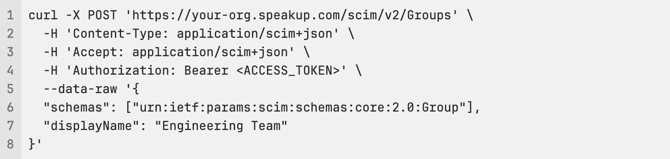
4.2 Request (with externalId and members)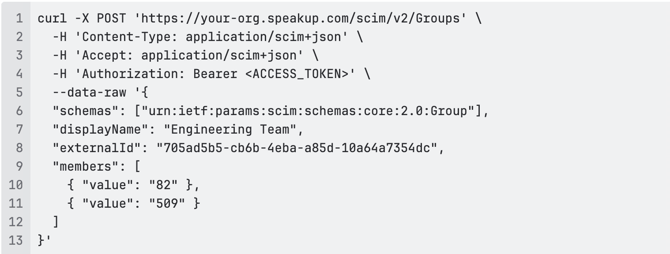
4.3 Response (201 Created)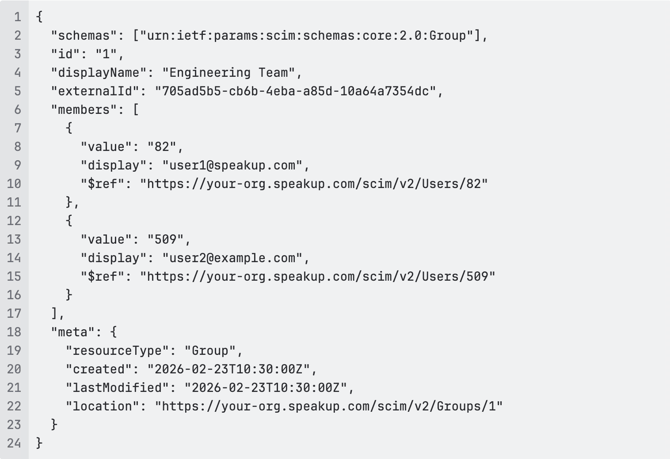
4.4 Common Errors
400 Bad Request (missing displayName):
409 Conflict (displayName already exists):
400 Bad Request (one or more member users not found or not eligible): 
5. Get a Specific Group
Retrieve details of a single group by ID.
HTTP Method: GET
Endpoint: /scim/v2/Groups/{id}
5.1 Request
5.2 Response (200 OK) 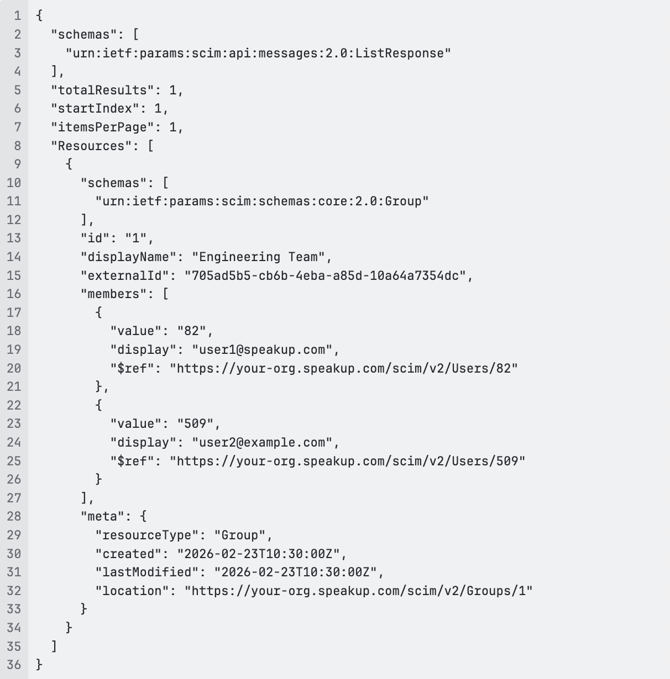
|
Parameter |
Type |
Description |
|---|---|---|
|
|
string |
Comma-separated list of attributes to omit (e.g. |
5.4 Request
5.5 Response (200 OK)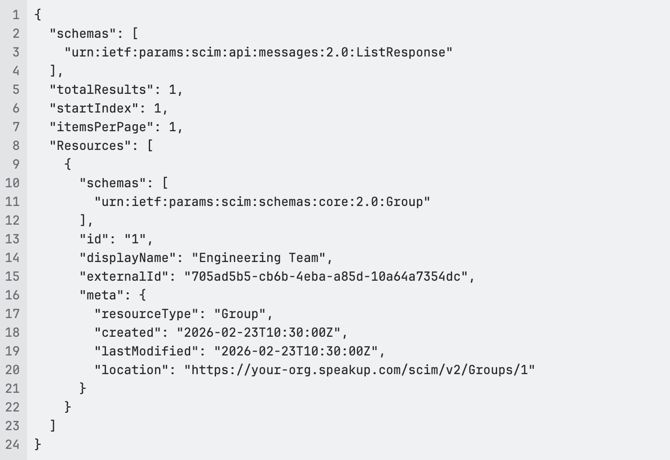
5.6 Error (404 Not Found)
6. List All Groups
Retrieve all groups with optional filtering and pagination.
HTTP Method: GET
Endpoint: /scim/v2/Groups
6.1 Query Parameters
|
Parameter |
Type |
Description |
Example |
|---|---|---|---|
|
|
integer |
Starting position (1-based). Default: 1 |
|
|
|
integer |
Results per page. Default: 50 |
|
|
|
string |
Filter expression (URL encoded) |
|
|
|
string |
Comma-separated attributes to omit (e.g. |
|
6.2 Request (all groups, default pagination)
6.3 Request (with pagination)
6.4 Request (with filter)
6.5 Response (200 OK) 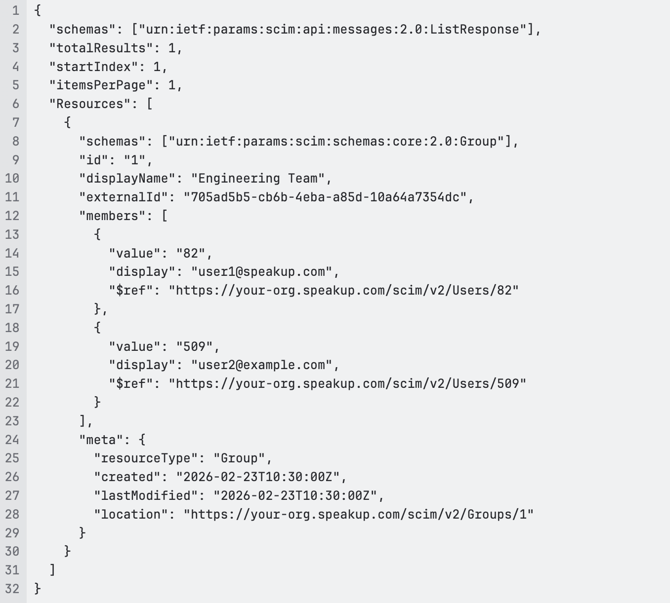
6.6 Filter Examples
|
Filter |
Meaning |
|---|---|
|
|
Exact match on display name |
|
|
displayName starts with "Eng" |
|
|
displayName contains "Team" |
|
|
Groups that have user with id 82 |
|
|
Groups that have member with email user@example.com |
7. Add Members to a Group
Add one or more users to an existing group.
HTTP Method: PATCH
Endpoint: /scim/v2/Groups/{id}
7.1 Request (single member)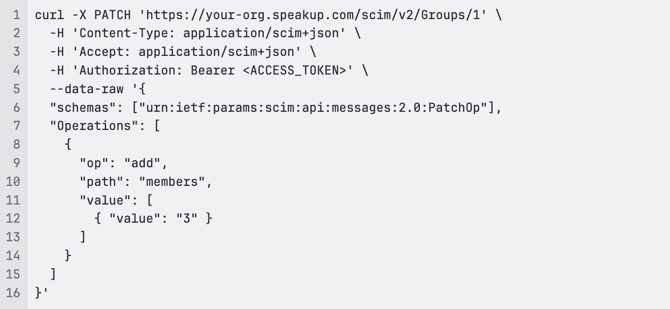
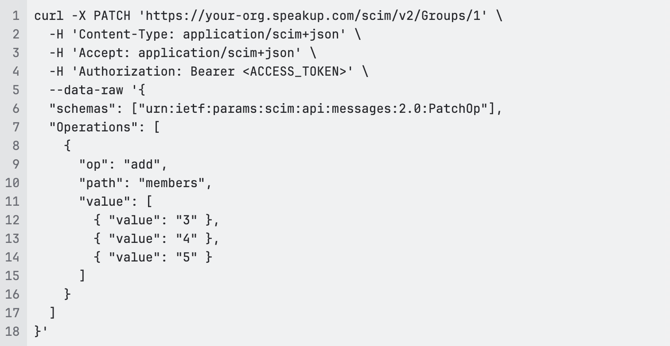
Returns the full group in SCIM format (including updated members and meta.lastModified).
7.4 Common Errors
404 Not Found (group does not exist):
400 Bad Request (user does not exist or is not eligible): 
8. Remove Members from a Group
Remove one or more users from a group.
HTTP Method: PATCH
Endpoint: /scim/v2/Groups/{id}
8.1 Request (single member)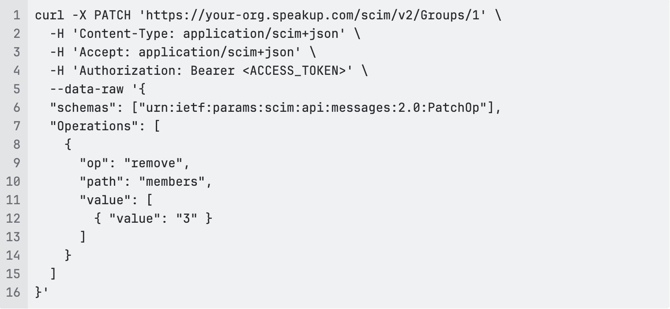
8.2 Request (multiple members) 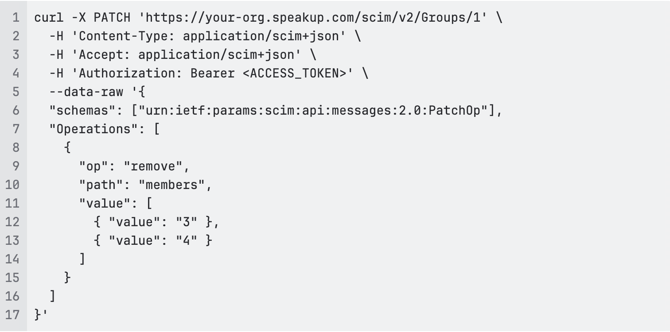
Returns the full group in SCIM format with updated members and meta.lastModified.
9. Update Group (PUT)
Update a group with full replacement. All writable attributes should be sent; omitted attributes are effectively cleared. Members not included in the payload are removed from the group.
HTTP Method: PUT
Endpoint: /scim/v2/Groups/{id}
9.1 Request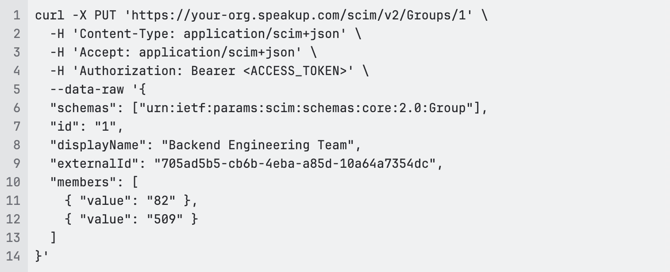
9.2 Response (200 OK)
Returns the full group in SCIM format. Members will include value, display, and $ref.
9.3 Error (409 Conflict)
10. Delete a Group
Delete a group. This removes the group but does not delete the users who were members.
HTTP Method: DELETE
Endpoint: /scim/v2/Groups/{id}
10.1 Request
10.2 Response (204 No Content)
No response body.
11. Common Status Codes
|
Code |
Meaning |
When It Occurs |
|---|---|---|
|
200 |
OK |
Successful GET, PATCH, or PUT |
|
201 |
Created |
Successful POST |
|
204 |
No Content |
Successful DELETE |
|
400 |
Bad Request |
Missing required fields, invalid data, or users not found |
|
401 |
Unauthorized |
Invalid or missing access token |
|
403 |
Forbidden |
Insufficient permissions |
|
404 |
Not Found |
Group or user does not exist |
|
409 |
Conflict |
Duplicate displayName or constraint violation |
|
500 |
Internal Server Error |
Server-side error |
12. SpeakUp ↔ SCIM Attribute Mapping (Groups)
|
SpeakUp group property |
SCIM attribute |
Data type / field type |
Explanation |
|---|---|---|---|
|
|
|
string |
Identifier for the resource as defined by the service provider (returned in responses; read-only). |
|
|
|
string / short text |
Human-readable name for the group. Must be unique. |
|
|
|
string |
External identifier (e.g. from IdP). Unique if set. Optional on create/update. |
|
|
|
complex |
List of members of the group. Each member has |
|
|
|
string (ISO 8601) |
When the group was created. |
|
|
|
string (ISO 8601) |
When the group was last modified. |