
Company context is an Administrator managed text field that tells Sienna about your organisation's structure, terminology, and workflows. When configured, Sienna uses this context to make its responses more relevant and accurate for your organisation.
Refer to What is Sienna Insights? for an overview of what Sienna can answer and how to use the chat.
Configure Company context:
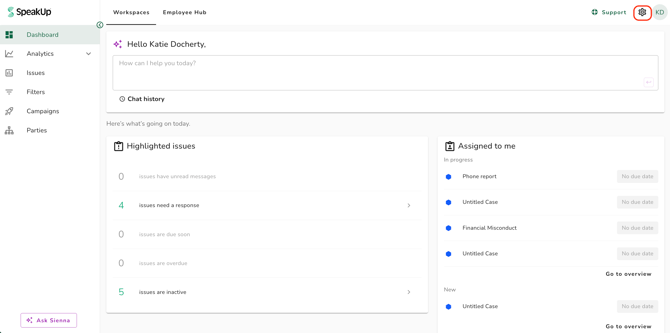
- Click on the "Settings" icon at the top right corner of SpeakUp.
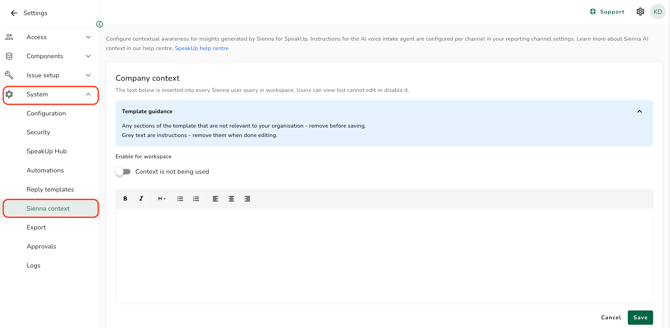
- Go to "System" and click "Sienna context" in the settings menu.
- Click into the Company context field and enter your organisation's context.
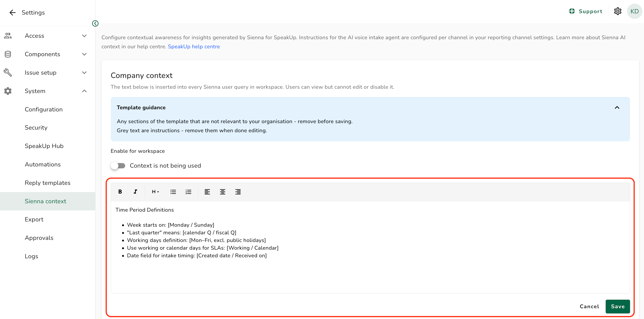
- Click "Save" to apply your changes. Sienna will use this context in all subsequent responses for your organisation.
What to include in Company context:
There is currently no built-in template in the field. To help Sienna give more accurate and relevant answers, we recommend copying the template below into the field and filling in the sections that apply to your organisation.
Remove any sections that do not apply to your organisation, and remove all descriptor and instructional text before saving. Leaving placeholder or guidance text in the field may confuse Sienna's responses.
Suggested starting template, copy this into the Company context field:
1. Company Structure
Industry (describe your primary industry and any relevant sub-sectors.)
- Industry: [e.g. Financial Services]
Geographic Footprint
- Employee count: [e.g. 12,000]
-
Regions:
- [Region 1, e.g. EMEA]
- [Region 2, e.g. AMER]
- [Region 3, e.g. APAC]
- Team name: [e.g. Ethics & Compliance]
- Reports to: [e.g. General Counsel]
- Regional structure: [Centralised / Decentralised]
- Applicable regulations:
- [e.g. SOX, GDPR, UK Bribery Act]
- Audit cycle: [e.g. Annual, Q2 and Q4]
2. Terminology
Acronyms & Aliases
Format: ACRONYM = Full meaning
- [COI] = [Conflict of Interest]
- [G&E] = [Gifts & Entertainment]
- [Add more...]
Regional Term Definitions
Define what each region covers internally so Sienna uses your geography, not a generic one.
- EMEA covers: [list countries]
- AMER covers: [list countries]
- APAC covers: [list countries]
Equivalent Terms Across Regions
Terms that mean the same thing but are phrased differently by region. Sienna will treat these as equivalent in all analysis.
- [AMER: "Weak internal controls"] = [APAC: "Process not enforced"]
- [Add more mappings...]
- Reporting channel name: [e.g. SpeakUp, EthicsLine]
- Programme name: [e.g. Integrity Programme]
- Local team names: [e.g. Compliance vs. Legal & Ethics by region]
- Definitions & Metrics
Language & Terminology
Replace the left-hand term with what your organisation uses. Sienna will always use your term in responses.
- Use "[Concern]" not "Case"
- Use "[Resolved]" not "Closed"
- [Add your own term mappings...]
- Week starts on: [Monday / Sunday]
- "Last quarter" means: [calendar Q / fiscal Q]
- Working days definition: [Mon–Fri, excl. public holidays]
- Use working or calendar days for SLAs: [Working / Calendar]
- Date field for intake timing: [Created date / Received on]
- The field has a maximum limit of 4,000 characters. An inline error will appear if you exceed this limit and the field cannot be saved until the content is within the limit.
- Company context applies to all users in your organisation. Individual users cannot set their own context.
- You do not need to fill in every section. Include only what is relevant and accurate for your organisation. Incomplete or inaccurate context may reduce the quality of Sienna's responses.