
Once an Administrator has assigned the relevant Campaign role, you can create and manage campaign forms. Campaign forms are managed separately from standard forms and are only available for use in the Campaign.
To create a campaign form
- Go to "Settings" and navigate to "Campaign forms"
- Click "New campaign form" to create a new template.
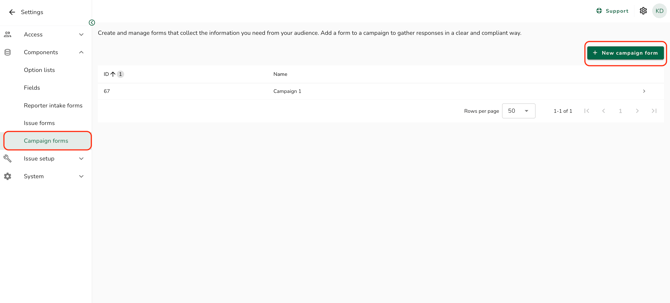
- Enter a name for the form.
- Add fields to the form. (How do I create a field?) Repeat this step until all required fields have been added. Click "Add to form" to save the fields to the form.
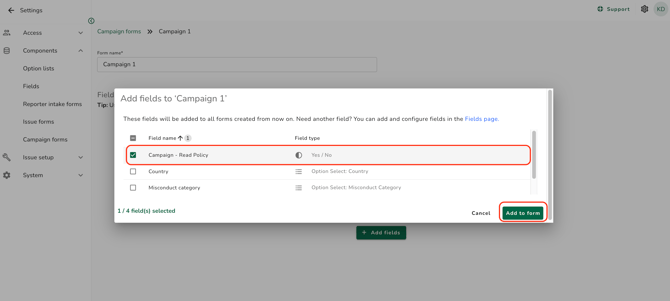
Campaign forms are only available for selection when in Campaigns.
Editing a campaign form
To edit an existing Campaign form, open "Settings" then "Components" then "Campaign Forms". You can:
- Add additional Fields
- Make a Field mandatory
- Remove field from the Form
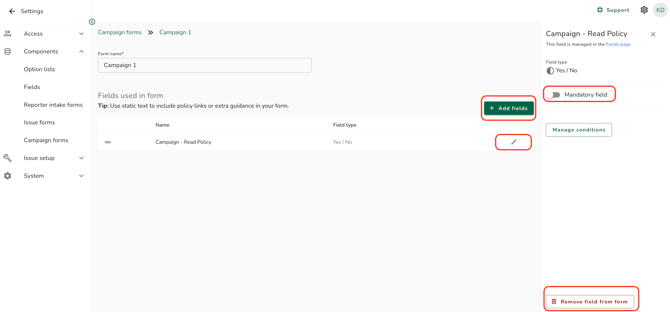
Editing a campaign form template does not apply to campaigns that are already published. Published campaigns continue to use the version of the form that was captured at the time of publication.
A campaign form with no fields cannot be selected when creating a campaign. Make sure all forms intended for use have at least one field.