
Users with the "Import issues" permission can import historical Issue data into SpeakUp using a CSV file.
To prepare your file for import:
- The file format should be CSV.
- All date fields should be in ISO 8601 format (yyyy-mm-ddThh:MM:ss.000Z).
- Boolean fields should be imported as "true" and "false".
- The Assignee field should match a user's email address.
- Closing date and Data retention date can only be set for Issues with a status in the "Done" category.
- Creation date and Status are required for mapping - all other fields are optional.
- The maximum number of Issues per file is 10,000.
Steps to import Issues into SpeakUp:
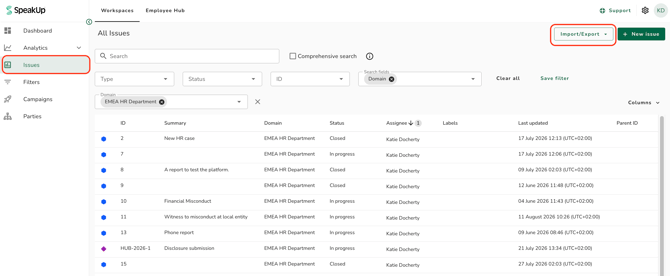
- Go to "Issues" on the left menu, click the Import/Export button, and select "Import issues"
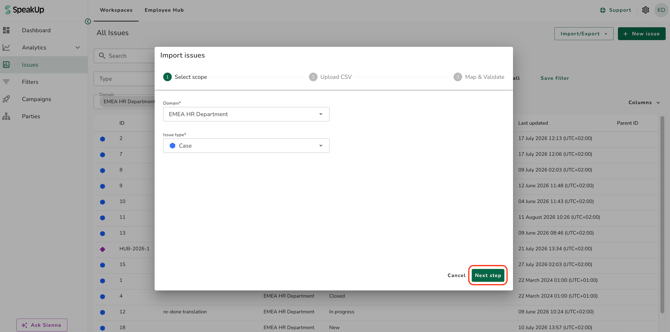
- Select the Domain and Issue type where the Issues should be created, then click "Next step"
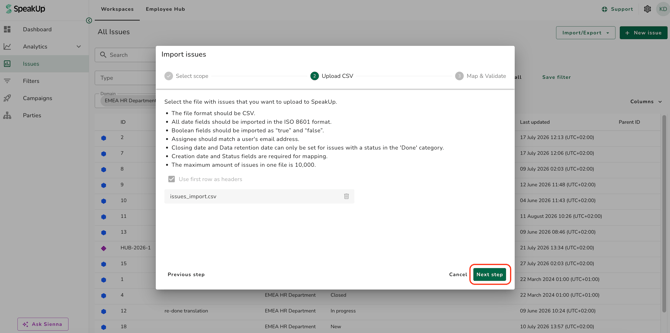
- Review the instructions, select your CSV file, indicate whether the first row is a header, and click "Next step"
- Map each column in your CSV to the corresponding SpeakUp field.
- Review the validation results. Each mapped column shows a success, failure, or skipped status. Correct any errors in your CSV and re-upload before continuing.
- When all mandatory fields are mapped and no errors remain, click "Start Import"
-
All Issues in a single import must share the same Domain and Issue type. To import Issues of different types or across multiple Domains, run the tool separately for each.
-
If an Assignee value is valid but the matched user does not have access to the Issue's Domain, the Issue will be imported with no Assignee assigned. No error is shown.
- The import runs in the background. You don't need to keep SpeakUp open. You will receive an email when the import completes or fails.
Imported Issues cannot be deleted and the import cannot be undone. Review your mapping carefully before starting.
Supported fields:
The following Standard Issue Properties are available for mapping:
- Creation date (required): ISO 8601 date-time format
- Status (required): must match a status for the selected Issue type
- Summary: maximum 500 characters
- Description: maximum 50,000 characters
- Resolution: must match a resolution for the selected Issue type
- Received at: ISO 8601 date-time format
- Acknowledged at: ISO 8601 date-time format
- Closed at: ISO 8601 date-time format; Issue must have a Done status
- Due date: ISO 8601 date-time format; can be any date in the past or future
- Assignee: must match the email address of an existing user with access to the domain to where the cases will be imported
- Data retained until: ISO 8601 date-time format; Issue must have a Done status
- Custom Issue fields and custom form fields for the selected Issue type are also available for mapping, depending on their field type.
-
Multi-select fields, attachments, comments, linked Issues, and Reporter data cannot be imported.