
The Terms of Use require every User to read and accept your organisation’s policies before they can access the platform. Once published, the Terms of Use are presented to all Users the next time they sign in.
Add and publish Terms of Use:
Updating published Terms of Use:
What Users see at login:
After you publish, every User is shown the full Terms of Use when they log in.
Add and publish Terms of Use:
- Go to "Settings" then "Configuration" and open the "Terms of Use" tab
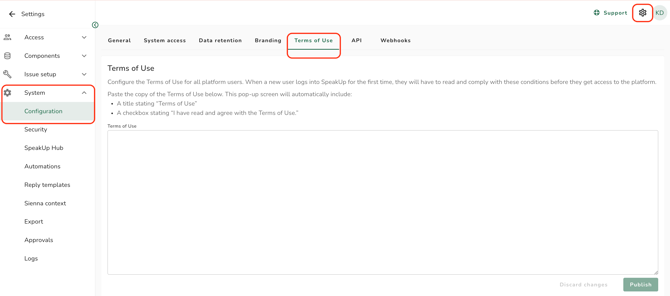
- Enter your organisations Terms of Use in the text field
- Click on "Publish"
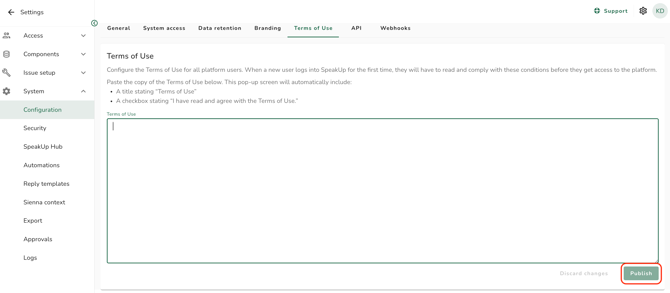
The Terms of Use can contain a maximum of 50,000 characters.
A confirmation message indicates that the Terms of Use have been published. From that moment, every User must accept them at their next login before they can proceed.Updating published Terms of Use:
- Edit the text in the "Terms of Use" tab
- Click on "Publish"
Republishing means all Users, including those who accepted an earlier version, must read and accept the Terms of Use again at their next login.
Removing the Terms of Use:
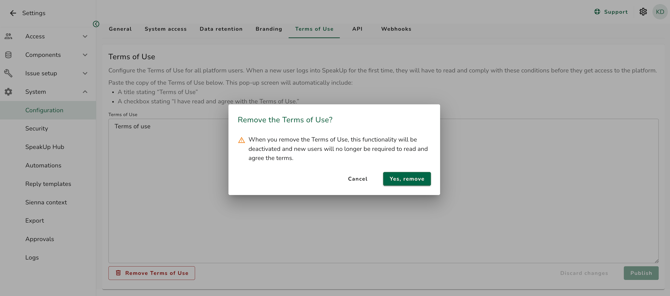
- Open the "Terms of Use" tab and click "Remove"
- Click "Yes, remove" to complete the removal
What Users see at login:
After you publish, every User is shown the full Terms of Use when they log in.
- Accept: The User continues to the platform as normal.
- Decline: The User is logged out and returned to the login page. They cannot use the platform until they accept.
All actions related to the Terms of Use - publishing, republishing, removing, and each User’s acceptance - are recorded in the system logs.
The Terms of Use apply to system users only and do not apply to reporters.