
Target release date: 23 June 2026
Wha'ts included:
- Branded email notifications
- Multi-IDP SSO
- Links in forms
- Preview documents
- Employee 360
- Adjustment to phone support in Suriname, Lebanon and French Polynesia
Employee 360
Case managers can now access a broader view of an employee's history within SpeakUp directly from an issue: prior reports, case involvement, and patterns over time. It's not surveillance. It's the context your team needs to make fairer, better-informed decisions.
Explore feature with interactive demo.
What's new:
Three new roles to control access: party viewer (view only), party editor (view and configure own parties), and party manager (view and configure all parties).
- A new "Parties" menu item in the workspace lets case managers build out a full party profile: properties, linked issues, campaign assignments, and history.
- Implements the POLE data model (Persons, Objects, Locations, Events) within SpeakUp.
- An "Involved parties" section now appears within the issue detail page.
Employee 360 is an add-on feature. For access, reach out to your Customer Success Manager for pricing and packaging.
Branded email notifications
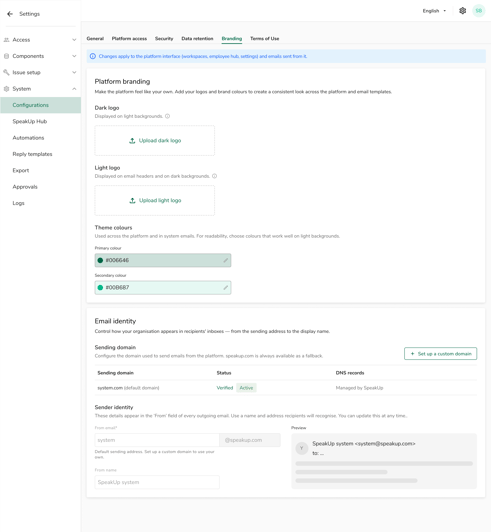
Every outbound notification from SpeakUp can now carry your organization's branding. Case updates, invitations, and follow-up emails will feel native to the organization your employees already trust.
What's new:
- Upload your logo (dark and light variants) and set primary and secondary theme colors in Settings > System > Configurations > Branding.
- Configure a custom sending domain and sender identity, so notifications arrive from your domain rather than speakup.com.
- Domain verification via DNS records (TXT and MX). SpeakUp polls automatically and updates status within 15 to 72 hours.
Notifications now branded:
- General: system invitations, forgot password emails.
- Hub: replies, status changes, campaign invitations, campaign reminders.
- Workspaces: access invitations, new comment notifications.
- System: automation failure alerts.
Out of scope for this release: reporter flow emails are not yet brandable.
Multi-IDP SSO
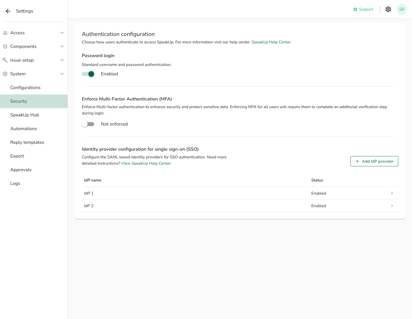
Larger organizations often run more than one identity provider. Multi-IDP SSO lets your team connect multiple identity providers (up to 10) to a single SpeakUp environment, without forcing non-IDP users (contractors, external collaborators) off password login.
What's new:
- SSO and local password login can coexist within the same organization.
- Configure up to 10 identity providers per environment.
- Email domain mapping routes users to the correct IDP at login based on their email domain (up to 20 domains per IDP).
- SSO and MFA settings have moved to the "Security" menu option for clearer navigation.
- New SSO users now receive a welcome email confirming access (previously, they received no confirmation).
Coming next: bulk invite, allowing invitations to be sent or resent to multiple users at once from the User Overview.
Links in forms
Forms across SpeakUp now support rich text and hyperlinks, in both reporter intake forms and case management forms. Reporters can access policies, FAQs, and guidance from within the form itself. Case managers can reference procedures and materials without switching tabs.
-1.png?width=460&height=481&name=image%20(1)-1.png)
What's new:
- Add rich text and clickable links to static text fields in reporter intake forms and issue forms.
- Links to external documents can be embedded directly, so admins link to live sources rather than duplicating content.
- Reduces reporter drop-off by surfacing answers to common questions in the moment.
- Translations: static text fields with links support translation file upload and download. Note: editing the text will replace any existing translations.
Document preview
Users can now preview documents directly within the issue document section, without downloading them or opening a second application. In investigation workflows where reviewers scan dozens of files, this removes meaningful friction.
.png?width=385&height=353&name=image%20(2).png)
Supported file types: PNG, JPG, JPEG, GIF, WebP, SVG, and PDF.
Not supported for preview: Word, Excel, PowerPoint, audio, and video files display a "Preview not available for .[ext] files" placeholder.
Also in this release:
- Add a description to any document directly from the document list.
- Hover over a document with a description to see a tooltip preview of the description text.
Local phone support change
Due to supplier restrictions, we are no longer able to offer the following SpeakUp phone numbers. We invite reporters in these countries to use the Web reporting option or use the voice option in the SpeakUp app:
Suriname: 8338160919
Lebanon: 8338160913
French Polynesia: 0800914886