
Overview
This documentation demonstrates how to obtain JWT Bearer tokens from Amazon Cognito User Pools using Node.js. We focus on Node.js because it provides dedicated client libraries that allow direct user authentication without requiring AWS CLI configuration, IAM roles, or AWS access keys.
Why Node.js for Cognito Authentication?
Unlike standard AWS SDKs in other languages (Python boto3, Java AWS SDK, .NET AWS SDK, etc.), which primarily expose administrative Cognito operations requiring AWS credentials, the Node.js ecosystem provides purpose-built client libraries specifically designed for end-user authentication:
-
amazon-cognito-identity-js (Legacy - Still functional)
-
AWS Amplify Auth (Modern - Recommended)
What Makes This Different?
|
Requirement |
Node.js Libraries (Amplify Auth / amazon-cognito-identity-js) |
Other AWS SDKs (Python/Java/.NET) |
|---|---|---|
|
AWS Access Keys |
Not needed |
Required |
|
AWS CLI Configuration |
Not needed |
Required |
|
IAM Roles |
Not needed |
Required |
|
What You Need |
User Pool ID + Client ID + User Credentials |
AWS credentials + User Pool info |
Core Concept: Node.js libraries allow you to authenticate users and retrieve JWT tokens using only:
-
User Pool ID (public identifier)
-
App Client ID (public identifier)
-
User credentials (uuid/password)
Authentication Goal
Primary Objective: Exchange user credentials for JWT tokens
What You'll Get:
-
ID Token - Contains user identity information and attributes. This is used to make API calls to your public APIs
-
Access Token - Used to authorize access to AWS Cognito User Pool APIs and AWS resources
-
Refresh Token - Used to obtain new ID/Access tokens when they expire
Option 1: AWS Amplify Auth (Recommended)
Why Amplify Auth?
-
Official AWS recommendation for user authentication
-
No AWS credentials required - works with User Pool config only
-
Active development and modern API design
-
Automatic token management and refresh
-
TypeScript support with full type definitions
System Requirements: Node.js 16.x or higher
Installation

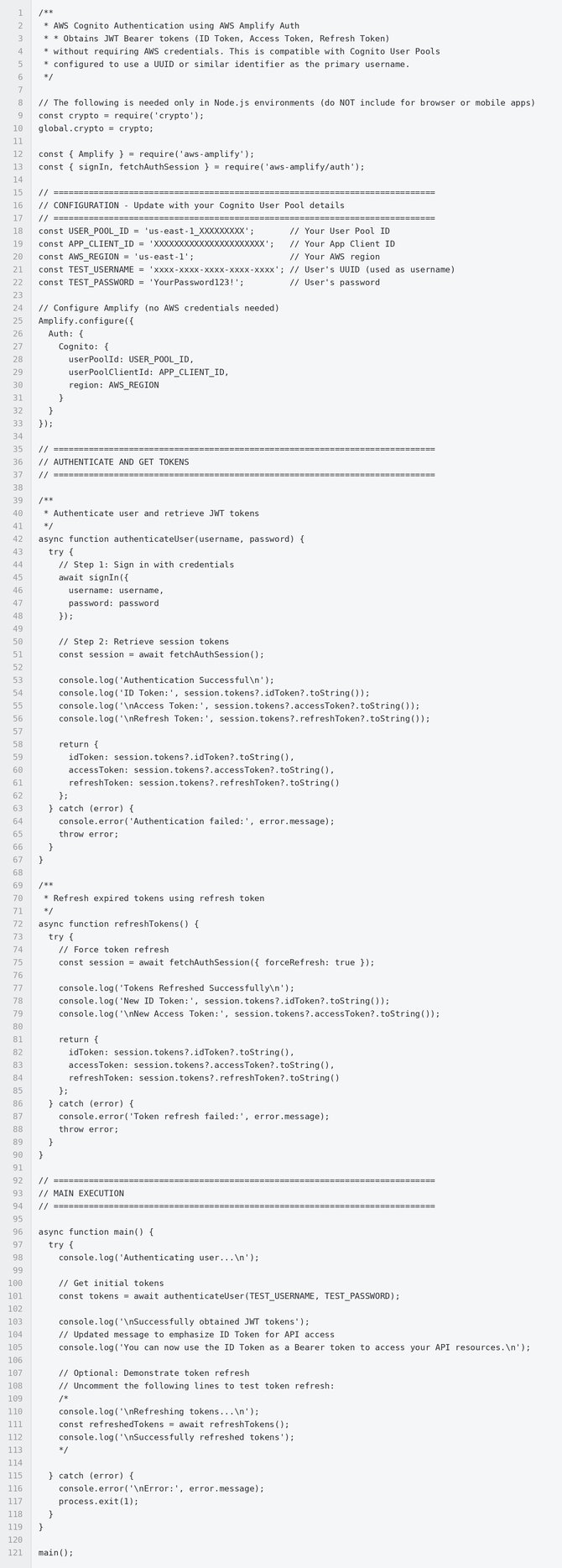
Usage Instructions
Step 1: Install dependencies

Step 2: Update configuration
-
Set your
USER_POOL_ID -
Set your
APP_CLIENT_ID -
Set your
AWS_REGION -
Set your
TEST_USERNAMEandTEST_PASSWORD
Step 3: Run the script

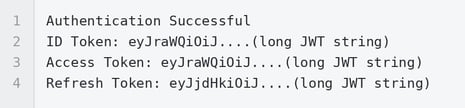
Step 4: Expected Output
Option 2: amazon-cognito-identity-js (Legacy)
Why This Option?
-
Legacy library - AWS recommends migrating to Amplify
-
Still functional and widely used in existing projects
-
No AWS credentials required - same advantage as Amplify
-
Lightweight with minimal dependencies
System Requirements: Node.js 14.x or higher
Installation

Implementation
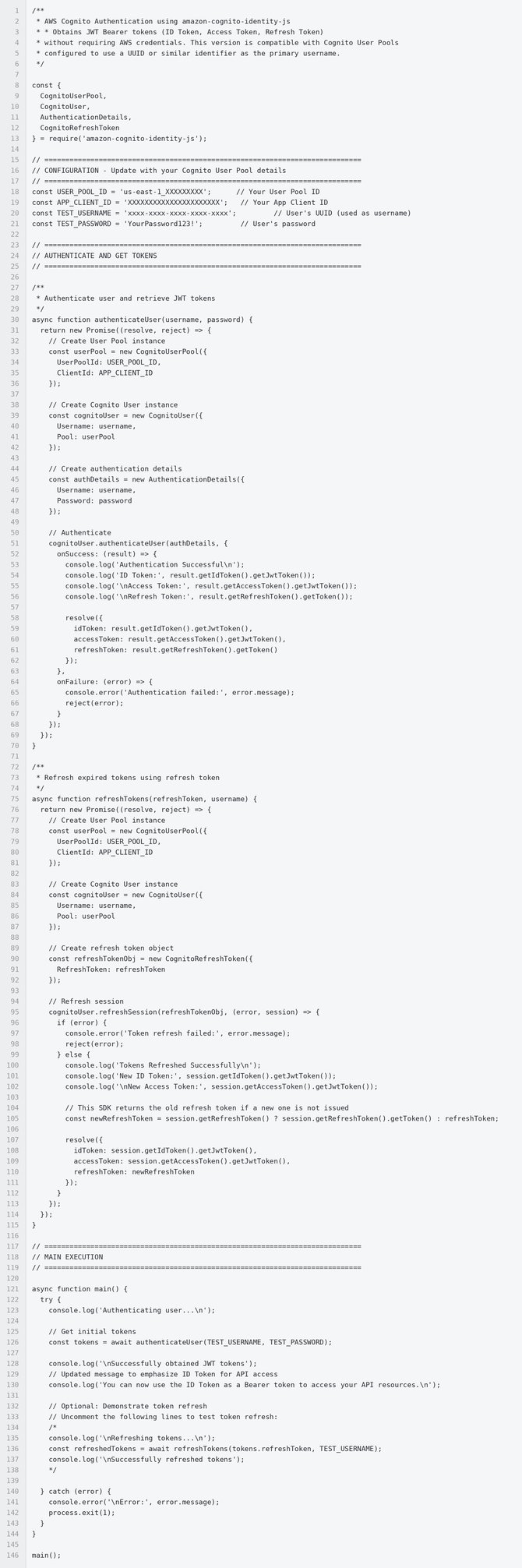
Usage Instructions
Step 1: Install dependencies
Step 2: Update configuration
-
Set your
USER_POOL_ID -
Set your
APP_CLIENT_ID -
Set your
TEST_USERNAMEandTEST_PASSWORD
Step 3: Run the script

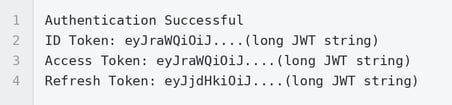
Step 4: Expected Output
Token Refresh Flow
When to Refresh Tokens
-
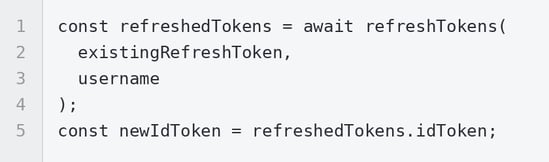
In our setup, ID and Access tokens expire after 10 minutes, but the refresh token remains valid for 1 hour
-
Before making API calls, check token expiration
-
Use refresh token to get new tokens without re-authenticating
Refresh Token Example
AWS Amplify:

amazon-cognito-identity-js:
Making Authorized API Calls
Once the ID Token is successfully obtained, it must be included in the HTTP request headers along with the mandatory custom Client header.
The ID Token expires after approximately 10 minutes and must be refreshed using the Refresh Token before making subsequent calls.
Required Headers
|
Header Key |
Value Format |
Purpose |
|---|---|---|
|
|
|
OAuth 2.0 authorization using the ID Token. |
|
|
|
Custom identifier for your client application. |
Available Endpoints
|
Method |
Endpoint |
Description |
|---|---|---|
|
|
|
Retrieve a list of public issues. |
|
|
|
Retrieve a specific public issue by ID. |
CURL Request Example
1.Get All Issues (List)

2. Get a Specific Issue (By ID)

Note: You must replace all bracketed placeholders in the curl commands:
-
<ISSUE_ID_HERE>: The actual unique identifier of the specific issue you want to retrieve. -
<YOUR_ID_TOKEN_HERE>: Your valid and current Bearer token (ID token or access token) used for authorization. -
<CLIENT_SYSTEM_NAME>: The client system name.How to Find the
<CLIENT_SYSTEM_NAME>:This name is typically derived from the subdomain of your system's URL.
Example:
If your system's login URL is:
https://showroom.client.speakup.cloud/loginThen your
<CLIENT_SYSTEM_NAME>isshowroom.
Comparison Summary
|
Feature |
AWS Amplify Auth |
amazon-cognito-identity-js |
|---|---|---|
|
AWS Recommendation |
Yes |
Deprecated |
|
Requires AWS Credentials |
No |
No |
|
Active Development |
Yes |
Maintenance only |
|
TypeScript Support |
Full |
Limited |
|
Setup Complexity |
Simple |
Simple |
|
Use for New Projects |
Recommended |
Not recommended |
|
Use for Legacy Projects |
Migrate when possible |
Continue using |
Key Takeaways
-
No AWS Credentials Required: Both libraries work without AWS CLI, access keys, or IAM roles
-
Node.js Advantage: Dedicated client libraries designed specifically for user authentication
-
Choose Amplify: For new projects, AWS Amplify Auth is the recommended approach
-
Both Work: Legacy library still functional but plan migration to Amplify
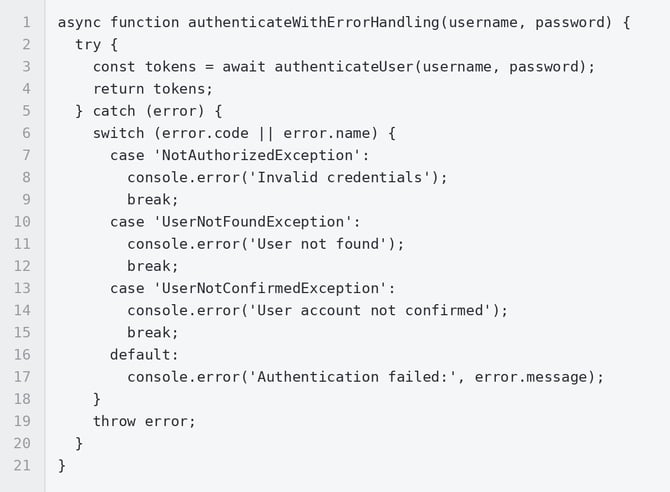
Error Handling
Common Errors
NotAuthorizedException
-
Cause: Invalid username or password
-
Solution: Verify user credentials
UserNotFoundException
-
Cause: User doesn't exist in the User Pool
-
Solution: Check username and ensure user is created
UserNotConfirmedException
-
Cause: User account not confirmed
-
Solution: Confirm user account via email/phone verification
TooManyRequestsException
-
Cause: Rate limit exceeded
-
Solution: Implement retry logic with exponential backoff
NetworkError
-
Cause: Network connectivity issue
-
Solution: Check internet connection and AWS service availability
Error Handling Example
Summary
This documentation provides two working approaches for obtaining JWT Bearer tokens from Amazon Cognito User Pools using Node.js, both of which do not require AWS credentials:
-
AWS Amplify Auth (Recommended for new projects)
-
amazon-cognito-identity-js (Legacy, but still functional)
Both libraries leverage Node.js-specific client implementations that allow direct user authentication without the need for AWS CLI configuration, IAM roles, or AWS access keys. This makes Node.js the ideal choice for client-side authentication scenarios where AWS credential management is not desired or feasible.