
If a wrong password is entered for a report too many times, SpeakUp permanently locks that report. This protects the reporter’s information from anyone trying to guess their password.
What you see as a case handler:
- A red banner in the Report section of the Issue: “Reporter access locked after too many failed login attempts at [date]
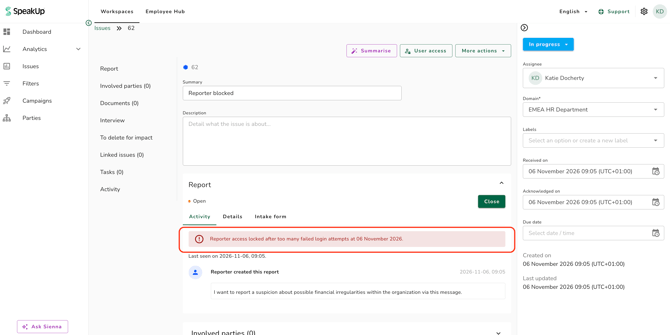
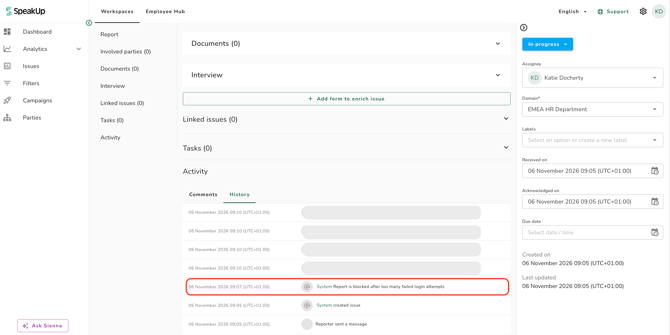
- A “Report blocked” entry in the Issue activity log.
- The Reply box is not available.
What the reporter sees:
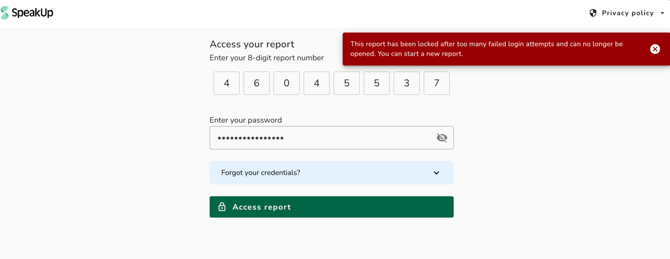
When the reporter next tries to log in, they see this message: “This report has been locked after too many failed login attempts and can no longer be opened. You can start a new report.”
What you can do:
- If you have another way to contact the reporter, let them know they can submit a new report.
- When the new report arrives, link it to the original Issue to keep the full history together. You can see how here: How do I link Issues?
You cannot unlock a locked report, and neither can SpeakUp. The lock is permanent.
- Administrators set the password requirements for reporters in each Channel’s settings. Longer password requirements allow more failed attempts before a report locks, so reporters who mistype their password have more room for error. You can see how to change these settings here: How do I set the password requirements for reporters?
- If you switch on passkey authentication, reporters can log in with their device’s fingerprint, face or screen lock instead. Failed passkey logins do not count towards the lock.
- If a reporter sees “Password attempts exceeded”, this is a temporary limit, not a permanent lock. It clears on its own, and the reporter can try again later.