
Each country has a local phone number for reporters to call. When calling the local number of their country, reporters will be asked to dial the organisation code of your Channel. Please make sure to include this code in your communication material. More details on the organisation code can be found here: Where can I find the URL, QR code, and organisation code?
On the web, Reporters see the same numbers grouped by country. Each number shows whether the call is free or charged at local rates, along with any dialling instructions. On a mobile phone, Reporters can tap a number to call it. Your organisation code stays visible while they scroll through the list.
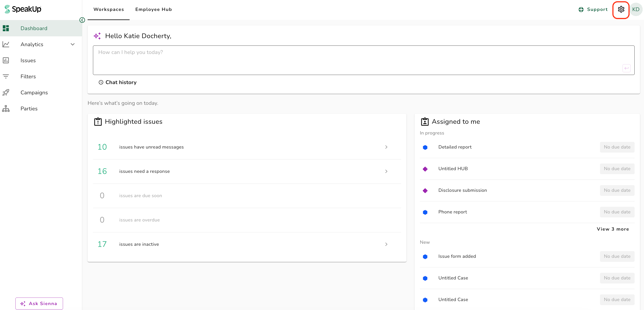
- Click on the "Settings" icon at the top right corner
-
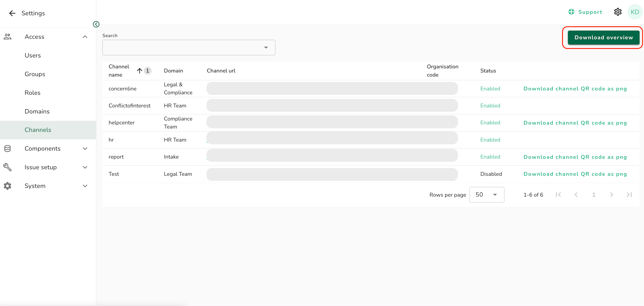
Go to “Access” on the menu and click on “Channels”
-
Click on “Download overview” on the top right corner of the page; you will download an excel file
-
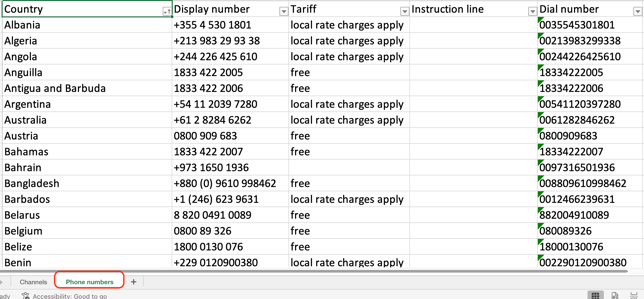
Open the excel file; click on the second tab "Phone numbers" at the bottom left of the screen; the file lists the numbers by country, and for each number it shows the number itself, whether the call is free or charged at local rates, and any extra dialling instruction
To enable reporters to leave messages via the phone line, ensure that "Voice Messaging" is enabled in your Channel settings. Depending on if you use human or AI translator, please note that transcribing and translating phone messages may result in additional costs. Also, your Channel's translation settings may affect the ability to leave a phone message. Go to Overview of translation options for more information.