
Users with Administrator rights can enforce Multi-Factor Authentication (MFA) for all system users, enhancing security and protecting sensitive data.
Administrators can also view each user's MFA status in the user overview.
Enforce MFA for all users:
-
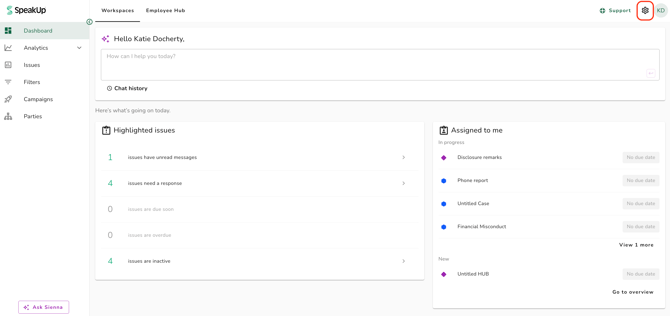
Click on the Settings on the top right corner
-
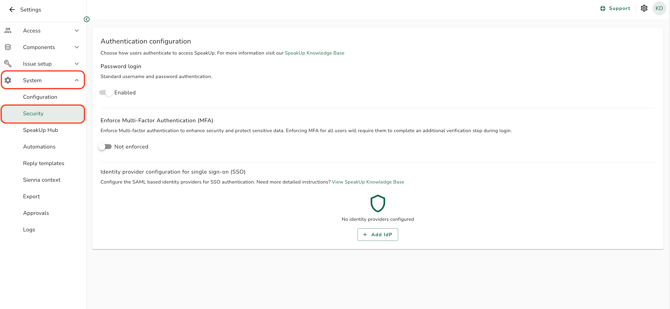
Navigate to “System” then “Security”
-
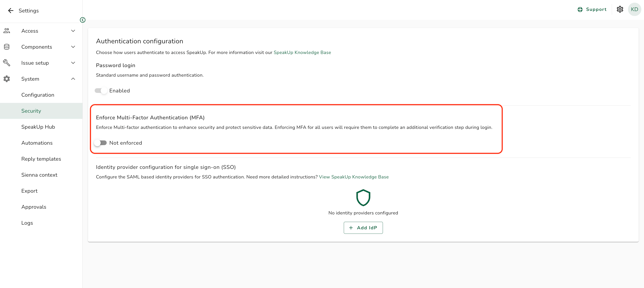
To enforce MFA for all users, click the toggle “Not enforced”.
-
A confirmation pop-up will appear. Confirm your action by clicking “Enforce MFA”.
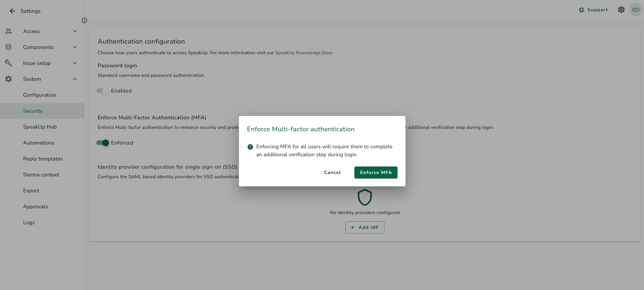
Once MFA is enforced, every user will be required to set it up the next time they log in. A user can disable MFA at an individual level, but as long as MFA remains enforced, they will be prompted to set it up again the next time they log in.
To change back to optional:
-
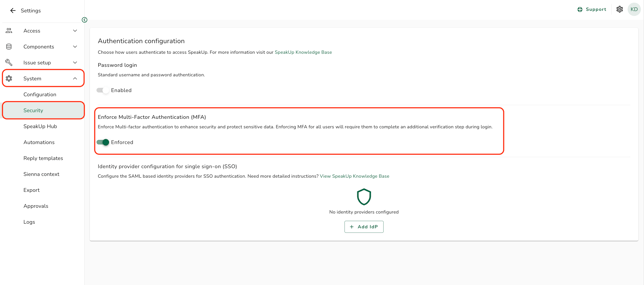
Navigate to “System” > “Security”
-
Click the toggle “Enforced”
-
A confirmation pop-up will appear. Confirm your action by clicking “Make MFA optional”.
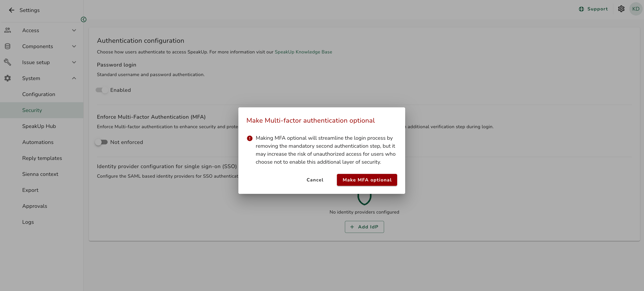
MFA will no longer be mandatory for all users. However, users can still enable MFA individually. To learn how to enable or disable MFA please read: How do I enable/disable Multi-Factor Authentication?