
To check if a reporter has read your reply message:
- Go to “Issues” on the left hand menu and click into the relevant Issue.
- Expand the “Report” section. Within the "Activity" tab:
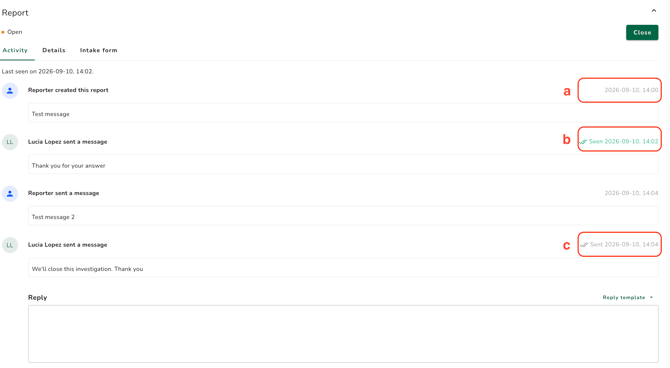
a. Metadata date, when the action was taken: Reporters and/or users timestamp of when they sent the message.
b. Seen date: The text and green colour indicate the message has been seen by the reporter.
c. Sent date: The text and colour indicate when the message has been sent to the reporter. It is updated to the ’Seen date’ once the message is read.
A report whose Reporter did not create a password or passkey shows no seen dates and no "Reporter was last seen" line, because that Reporter can never log in to read your messages.
See How do I reply to a Reporter's message?