
f your system has SpeakUp Paths, you can publish a Document from the Library to the Employee Hub. A new Document is not shown to anyone until you do.
To show a Document in the Employee Hub:
To show a Document in the Employee Hub:
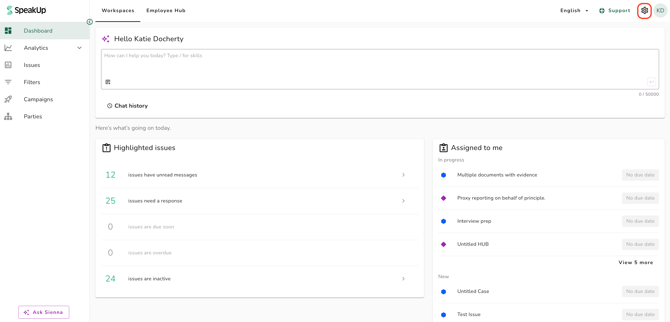
- Click on the "Settings" icon at the top right corner
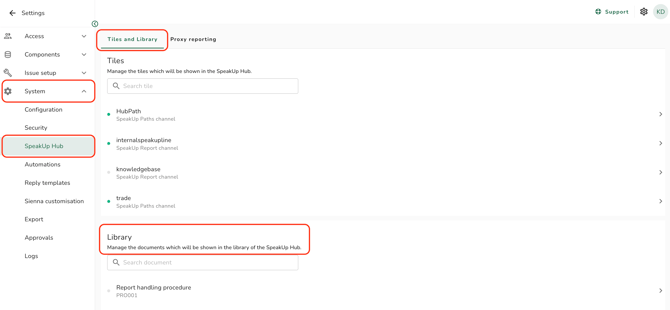
- Go to "System" on the menu and click on "SpeakUp Hub"
- On the "Tiles and Library" tab, find the Document in the "Library" card. Each entry shows the Document's name and its ID
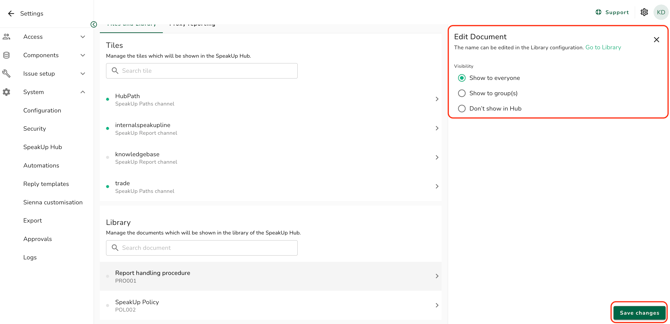
- Click on the Document; the "Edit Document" panel will open
- Select "Show to everyone", "Show to group(s)" or "Don't show in Hub"
- Click on "Save changes" to save your changes
- A green dot against a Document means it is visible to someone, and a grey one means it is not shown. The dot does not distinguish everyone from selected Groups.
- To rename a Document, follow the link in the "Edit Document" panel to the Library. You cannot change its name in this panel.
- Only Active and Planned Documents appear in this list. A Planned Document stays hidden until its first version takes effect.
- The "Library" tab is hidden from the Employee Hub entirely for people who have no Document published to them.
- Refer to What is the Policy Library? to learn more.
This feature is available on certain packages. To find out more, contact your Customer Success Manager by clicking “Support” and “Contact support”.