
By using Adaptive AI for language intake you can reach more people with an extended list of languages.
For the complete list of languages available, read: Intake language list.
Only Administrators can make this change
To enable, follow these steps:
- Navigate to "Settings" on the top right corner of your system
- Go to ''System'' on the left hand menu and click on ''Configurations'' and open the "General" tab:
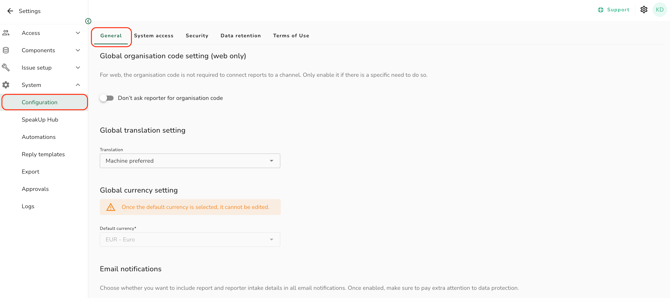
- Scroll down to AI Support and enable 'Allow AI-supported languages':
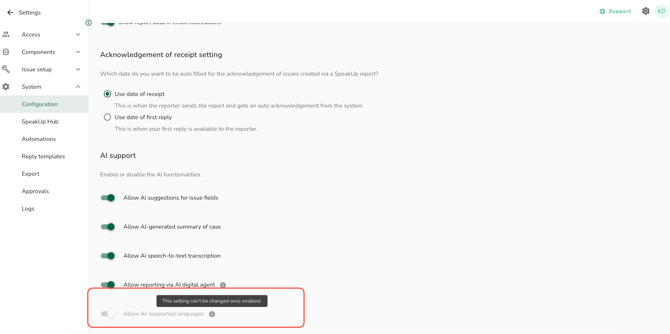
- Once Adaptive AI languages are enabled, you cannot revert back to Structure AI list
-
By activating this feature, the adaptive AI languages powered by OpenAI, are available in your channel's page, but not automatically enabled.
-
You have the control to enable only the languages you want but please note: they must be enabled in order to be available for the reporters. For further information click here.
Customised elements in the channel (web and app) are not automatically translated into newly added languages, even after those languages are enabled. You can add these translations in two ways:
1. Trigger automatic re-processing
Slightly modify the text (for example, add a space at the end) and save it. This will trigger re-processing of all translations. This method is simpler, but any existing customised translations will be overwritten by the default translation.
2. Use export/import of translations
Download the translations file and upload it again. This is the safest method, as it preserves any customised texts you have configured previously.