
Before enabling an Identity Provider (IdP) for all users, you can verify that the SAML configuration is correct by running a test login. Testing lets you confirm that SpeakUp and your Identity Provider are exchanging the right information before the change affects anyone.
You need a test account in your Identity Provider to complete this step.
Ask your IT team to set one up if you do not already have one.
Test your SSO configuration
- Complete the Identity Provider configuration in SpeakUp - refer to How do I add SSO?. Do not click "Enable IdP" yet.
- In your Identity Provider, make sure the account testing SSO is authorized to access the SpeakUp application.
- On the Security page in SpeakUp, select the IdP that has been configured and click "Test IdP".
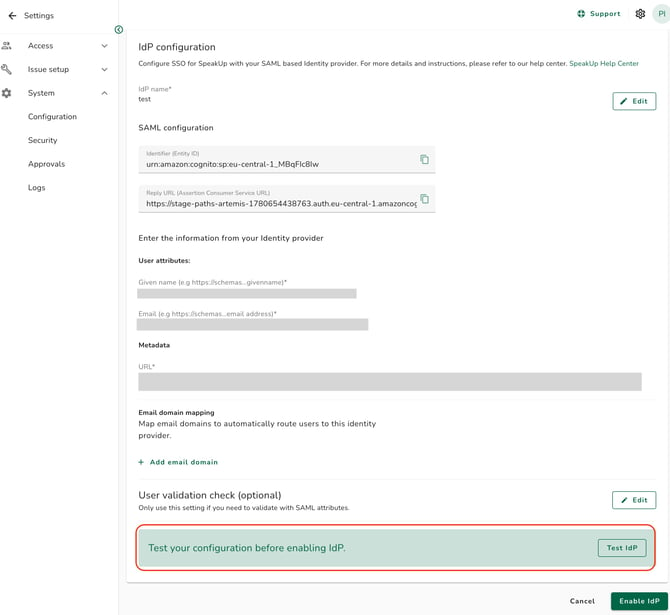
- A new browser tab opens and redirects you to your Identity Provider's login page.
- Log in with the test account.
- If the configuration is correct, you are redirected back to SpeakUp and a success message confirms that the SAML exchange worked. Close the test tab.
- If the test fails, an error message describes what went wrong. Common causes are listed below.
Common errors and how to fix them:
-
Metadata URL is unreachable or returns no data: Check that the federation metadata URL is publicly accessible and that the URL is complete with no trailing spaces. If your Identity Provider provides a metadata file rather than a URL, the file must be publicly hosted before you paste the URL into SpeakUp.
-
Attribute not found (Given name or Email): The attribute names in the User attributes fields do not match what your Identity Provider is sending in the SAML assertion. Check the attribute names or claim URLs in your Identity Provider's configuration and update the corresponding fields in SpeakUp to match exactly.
-
Audience mismatch or invalid Issuer: The Identifier (Entity ID) entered in your Identity Provider does not match the value SpeakUp provided. Copy the Identifier value from SpeakUp again and paste it into the corresponding field in your Identity Provider.
-
Reply URL mismatch: The Reply URL (Assertion Consumer Service URL) in your Identity Provider does not match the value SpeakUp provided. Copy it again from SpeakUp and update your Identity Provider.
-
User is not assigned to the application: The test account exists in your Identity Provider but is not assigned to the SpeakUp application. Assign it in your Identity Provider and try again.
-
Login loop or redirect back to login page: This can happen when the SAML response is incomplete or signed with an unexpected certificate. Confirm that the federation metadata URL points to the current, active metadata and that the certificate in your Identity Provider has not expired.
- The test does not enable the Identity Provider or affect any existing users. It only verifies the SAML exchange between SpeakUp and your Identity Provider.
- If the test account's email domain is not mapped to the Identity Provider you are testing, the test may still succeed - domain mapping is only evaluated during a real user login, not during the test flow.
- Once the test succeeds, return to the Identity Provider configuration page and click "Enable IdP" to activate SSO for your users. Refer to How do I add SSO? or How do I add an additional Identity Provider? for the full setup steps.
- If you cannot resolve a test failure, contact SpeakUp with the error message and a screenshot of your Identity Provider's application configuration.