
If your organisation uses more than one Identity Provider, you can configure each one separately in SpeakUp and route users to the right Identity Provider based on their email domain.
Before you can add a second Identity Provider, the first one must be configured and have at least one email domain mapped to it. How do I add SSO to the system?
You can add up to 10 Identity Providers per organisation.
Add an additional Identity Provider:
- Click on the "Settings" icon in the top right corner.
- Go to "System" on the menu and click on "Security".
- Open the Identity Providers overview and click on "Add IdP".
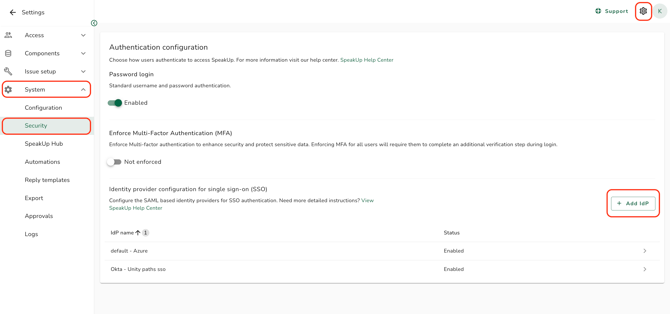
- Configure the new Identity Provider the same way you configured the first one. Refer to How do I add SSO to the system? for the steps.
- Map at least one email domain to the new Identity Provider. Email domain mapping is mandatory for every additional Identity Provider so that SpeakUp can route each user to the correct one at login. Refer to How do I map email domains to an Identity Provider?.
- Test the configuration before enabling it. Refer to How do I test if the SSO configuration is working properly?.
- Click on "Enable IdP".
- The "Add IdP" button is disabled until the first Identity Provider has at least one email domain mapped to it.
- Each Identity Provider must have a unique name within your organisation. If you enter a name that already exists, an inline validation error is shown before saving.
- An email domain can only be mapped to one Identity Provider in your organisation. If a domain is already mapped to another Identity Provider, an inline error is shown.
- When the maximum of 10 Identity Providers is reached, the "Add IdP" button is disabled and shows a tooltip.
- Email domains are only validated against enabled Identity Providers at login. Removing an Identity Provider removes its domain mappings from the login flow and may leave users with no valid authentication method. Refer to What is an unresolved user?.